
To learn about setting up the integration, see How to Set Up the Xero Integration.
Who can use the Xero Integration?
Only companies based in Australia, New Zealand, and the UK can use this integration, as all other payroll models are not compatible.
What data is imported when I integrate ClockShark and Xero?
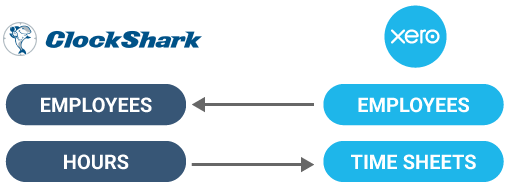
When you integrate ClockShark and Xero, your entire employee roster will be available for mapping. Learn more in How to Set Up the Xero Integration.
Once you have mapped your ClockShark employees to your Xero employees, you can export completed time records to Xero, where they will appear in the employees' timesheets. Learn more in How to Export Time to Xero.
How do I edit mappings?
To edit your Xero integration mappings, go to Admin > Integrations > Manage Xero > View and Edit Existing Mappings and click the pencil icon next to each employee’s name.
Select the correct name for the employee and click Update Mapping.
This is also where you can troubleshoot mapping issues. If you notice that employees are not mapping, you can edit the mapping for the affected employee.
How do I know if my employees have been mapped successfully?
On the mapping screen, the employee from Xero is listed on the left and the employee from ClockShark is listed on the right. As long as these two correspond correctly, the mapping has been successful.
When and how does data sync occur?
Data synchronization is manual. If a change is made in your Xero account, for example, moving an employee from one pay period to another, visit the Xero mappings page and sync Xero employees to make sure these changes are reflected in ClockShark.
What does the ‘Timesheet Tracking Categories are unsupported at this time’ error mean?
Tracking categories cannot be exported to Xero.
The Timesheet Categories option has been configured in your Payroll Settings in Xero. Ensure you’ve set the Timesheet Categories option to None before exporting timesheets from ClockShark.
Xero will preserve your existing timesheet categories, so you can re-enable the setting after the export if needed.
What does the integration cost?
The Xero integration is included free with your ClockShark account, and you can set it up yourself.
How do I disconnect from Xero?
Visit the Xero dashboard in ClockShark, select Manage Xero, and click Disconnect Your Company.
If I disconnect an employee from ClockShark will they be deleted in Xero?
No, the Xero integration cannot delete employees from Xero.