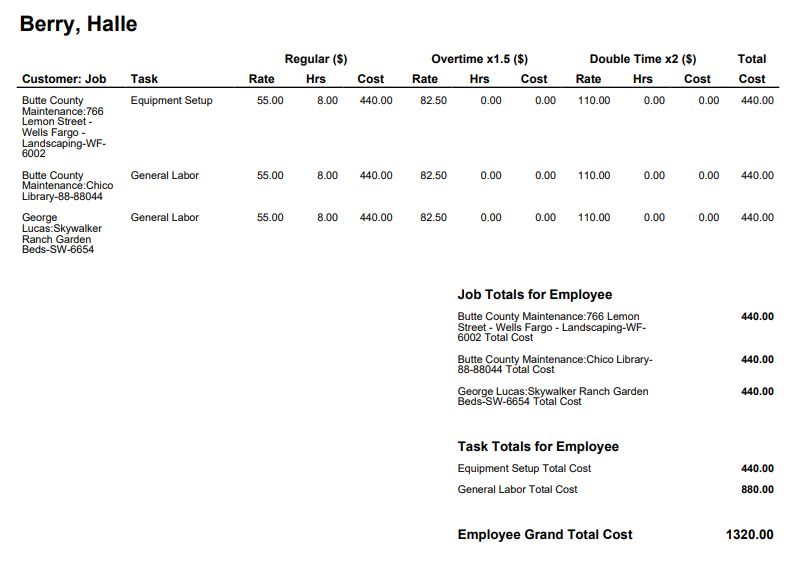
The Pay Rates Report is a simple pay rate calculator that provides labor costs per shift broken down by Regular Time, Overtime and Double Time rates grouped by employee, job or task.
To use this report, you need to have Base Pay Rates entered for every employee. Learn more in How to Use ClockShark Pay Rates.
Run the Pay Rates report
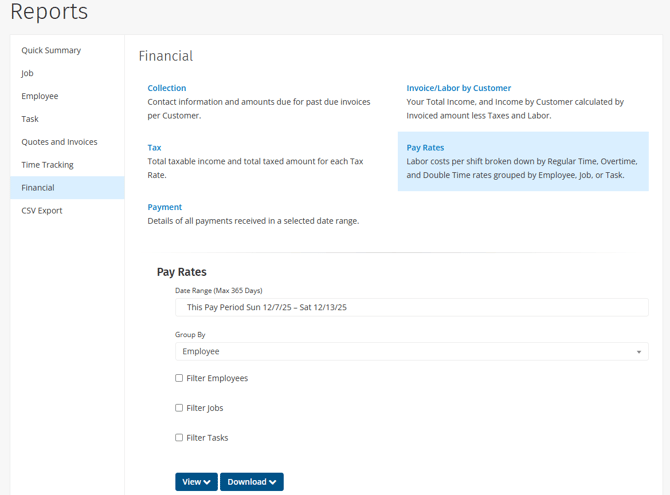
To run the report:
- Click Reports.
- Under the Financial section, click Pay Rates.
- Select a Date Range.
- Under Group By, select to group the results by Employee, Task or Job.
- To only include specific employees in this report, select Filter Employees and then select the employees, departments, or locations. If this option is not selected, the report includes all employees.
- To only include specific jobs in this report, select Filter Jobs and then select the jobs and customers. If this option is not selected, the report includes all jobs.
- To only include specific tasks in this report, select Filter Tasks and then select the tasks. If this option is not selected, the report includes all tasks.
- You can either view the report as a PDF or download the report as either a PDF or CSV file:
- Click View > PDF Portrait / PDF Landscape to view the report results in your browser.
- Click Download > PDF Portrait / PDF Landscape / CSV to download the report file to your computer.