
A Geofence is a virtual geographic boundary that reminds employees to clock in/out when arriving/exiting job sites and alerts Admins if employees clock in from outside the fence.
A unique geofence can be created for every job.
Create a geofence
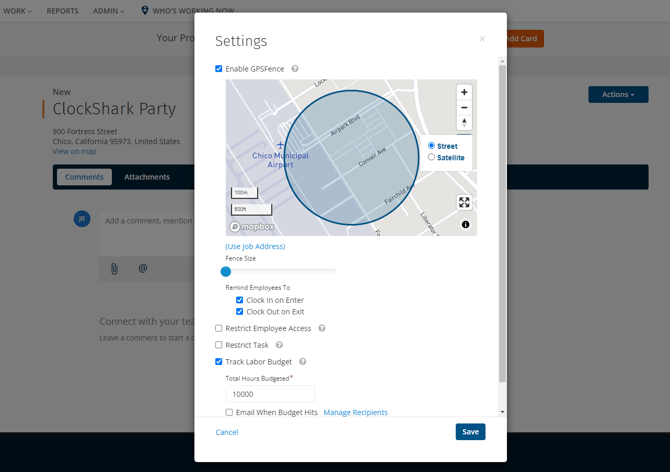
To create a geofence for a job:
- Go to Work > Jobs.
- Create a new job or edit an existing job.
- Go to Settings.
- Select the Enable Geofence checkbox.
- Click Use Job Address to set up the geofence around the job site.
- Alternatively, manually click on the map to create a geofence for a location that does not have an exact address.
- Click and drag the Fence Size slider to increase the diameter of the circle. The maximum size is roughly 1 mile in diameter and minimum size is 100 meters.
- Click Save.
Note: You can also set up an Out of Bounds alert to trigger when employees leave the geofence when clocked in/out. Learn more in How to Use Alerts, Notifications, and Reminders.