
How is GPS location accuracy determined in the ClockShark Mobile?
In the ClockShark Mobile, your smartphone’s GPS receiver is responsible for determining the location accuracy. This means that the accuracy of each GPS ping comes directly from your phone’s GPS hardware—not from the ClockShark app itself.
Learn more in Understanding GPS Accuracy.
Does ClockShark Mobile work offline?
GPS tracking in the ClockShark Mobile relies on GPS satellites, not the cellular network. Even if employees do not have cell phone coverage, they can still clock in and out. Their GPS location is recorded and will be sent to the web portal once the device regains a signal. (This may be briefly delayed depending on the situation.) We recommend refreshing or syncing the app to ensure the data is updated.
To sync ClockShark Mobile: after logging in to your ClockShark Mobile app, click your initial icon in the top right corner, then tap Sync Web and App Data.
What file types can You upload to ClockShark?
The supported file types are:
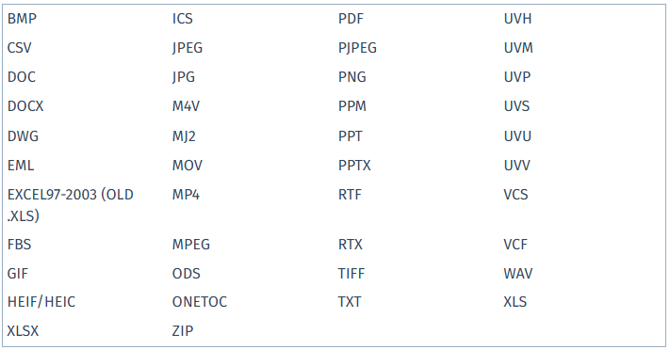
File formats that are not supported include EXE, HTML, and TSV.
In both the ClockShark web portal and the mobile app, you can upload different types of files as attachments. The size limit for individual files is 25MB. There is no limit for the total number of files you can upload.
More FAQs on GPS Location Sharing and Privacy.
Can I change ClockShark Mobile to Spanish?
The ClockShark Mobile uses the default language set on your mobile device. The only languages available for ClockShark are English and Spanish. If you’d like to use the app in Spanish, you’ll need to change your device’s language settings, as there isn’t an in-app option to switch languages within ClockShark Mobile.
To change the device language on an iPhone, learn more in Apple’s help article.
To change the device language on Android go to Settings > General Management > Language.
Learn more in How to Use the ClockShark Mobile App - Spanish.